Is Kaption safe to run?
Kaption is designed as a screen-based overlay, not a game modification. Every release is scanned by ~70 antivirus engines on VirusTotal, and both the setup bootstrapper and the installed executable are linkable by SHA-256 for verification.
Last updated: April 2026
TL;DR - screen overlay, public hashes, clean Defender scan.
Kaption reads pixels on your screen and draws a translation on top. It does not modify game files, inject code, hook processes, read game memory, or automate gameplay. No third-party tool can promise zero account risk, so the important thing to inspect is the technical behavior.
You can inspect the desktop client source
Kaption publishes the desktop client as open source. That means the code for screen capture, OCR, overlay rendering, update checks, crash reporting, local settings, and licence calls can be reviewed instead of guessed at.
Scope matters: the hosted API, production release pipeline, and proprietary translation packs are operated separately by Kaption. The public client repository is for auditing and building the desktop app, not a dump of every service secret or licensed dictionary.
VirusTotal results for the current release
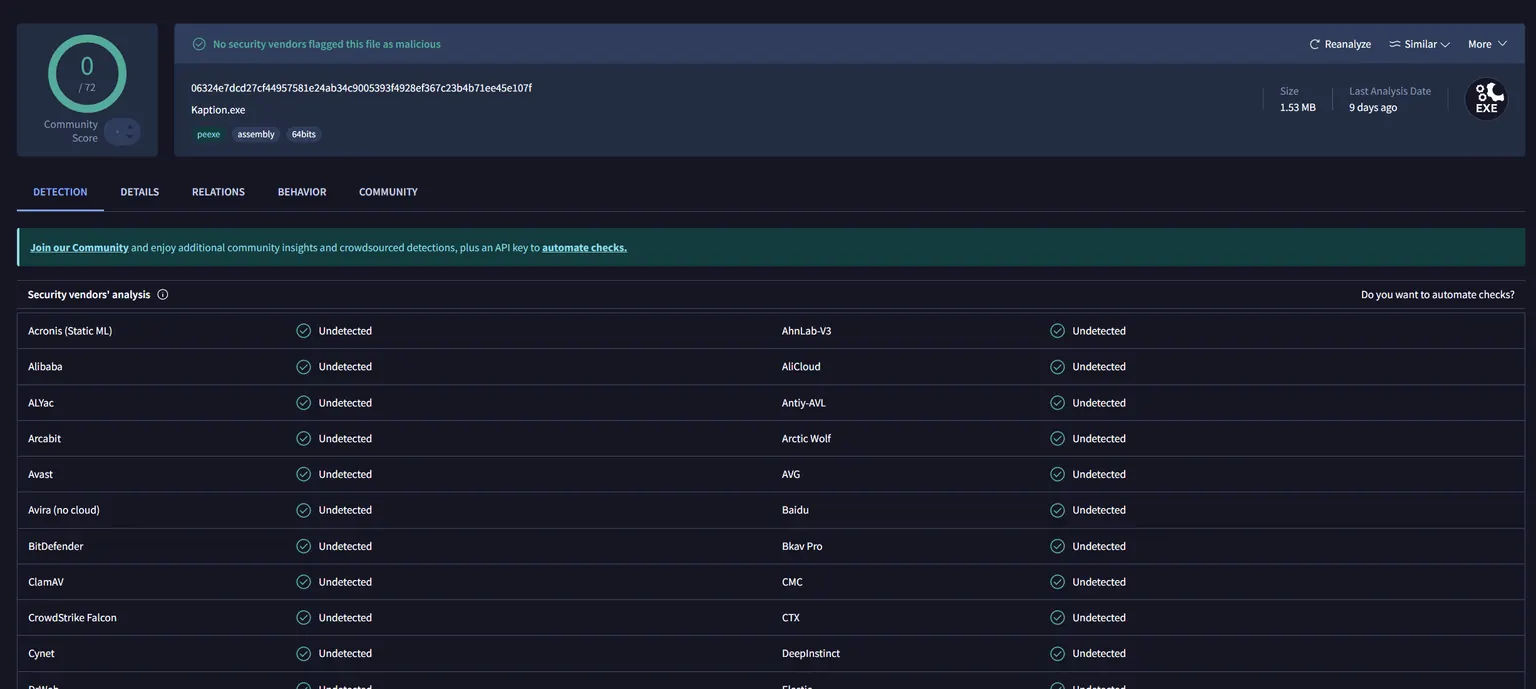
Click either card to open the live report on VirusTotal. The SHA-256 next to each file is what you can hash locally (PowerShell: Get-FileHash .\Kaption-stable-Setup.exe) to prove the file you downloaded matches the one we publish.
Kaption-stable-Setup.exe
View scanFresh-install bootstrapper — what you download from the landing page.
SHA-256
316aa4d8ac26063822841beaaa89aeef4e25cda4f8a5620e7cd76d382894b1d2
Kaption.exe (after install)
View scanThe actual application binary that runs after Setup.exe unpacks.
SHA-256
06324e7dcd27cf44957581e24ab34c9005393f4928ef367c23b4b71ee45e107f
"Windows protected your PC" — what's happening
SmartScreen shows "unknown publisher" because the installer is not code-signed during open beta. Authenticode certificates run ~€400/yr — we are parking that cost until the beta graduates and conversion justifies it.
To proceed: click More info, then Run anyway. This is the standard path for every unsigned indie app. Microsoft Defender itself (the actual antivirus engine behind the prompt) returns a clean scan on the binary — SmartScreen is only evaluating reputation, not threat content.
Why Trapmine reports Malicious.moderate.ml.score
Notice the .ml.score suffix. That is not a signature hit against known malware — it is a prediction from a machine-learning classifier. The model has seen features in Kaption's binary that also appear in bad files, so it errs on the side of a warning.
Three of those features apply to us today, and none of them are malicious:
- Unsigned binary. No Authenticode certificate yet (~€400/yr). Every unsigned indie app pays the same penalty with ML-based scanners.
- Low prevalence. Kaption is in open beta. Reputation telemetry has not seen the hash on enough clean machines to mark it as "known good" yet. Every new release resets that counter.
- Installer that extracts nested executables. Our auto-updater (Velopack) ships the app as a compressed package inside Setup.exe and unpacks it on first run. Structurally that is similar to a dropper, even though we are just an installer.
The real signal is the VirusTotal row: Microsoft Defender and ~70 other engines mark the file clean. A proper code-signing certificate is on the roadmap for when the beta graduates — that typically clears the last ML-based heuristic flags too.
What the app actually does on your machine
Does
- +Captures a user-picked region of your screen ~10 times per second.
- +Runs OCR locally via ONNX Runtime + DirectML (no cloud).
- +Looks up the recognised line in a local translation dictionary.
- +Renders a WPF overlay window on top of the game.
- +Talks to api.kaption.one for login and update checks only.
Does not
- −Modify game files, memory, or network traffic.
- −Inject DLLs, hook functions, or attach a debugger.
- −Upload screenshots, OCR text, or usage telemetry without opt-in.
- −Require administrator rights at runtime.
- −Leave background processes after you quit the app.
The full end-user terms are in the EULA. For the data side, see the Privacy Policy.
Still uncomfortable? Want a second pair of eyes before you run it?
Email contact@kaption.one — happy to walk you through what's inside the package. Usually replies within a day.